
Overview
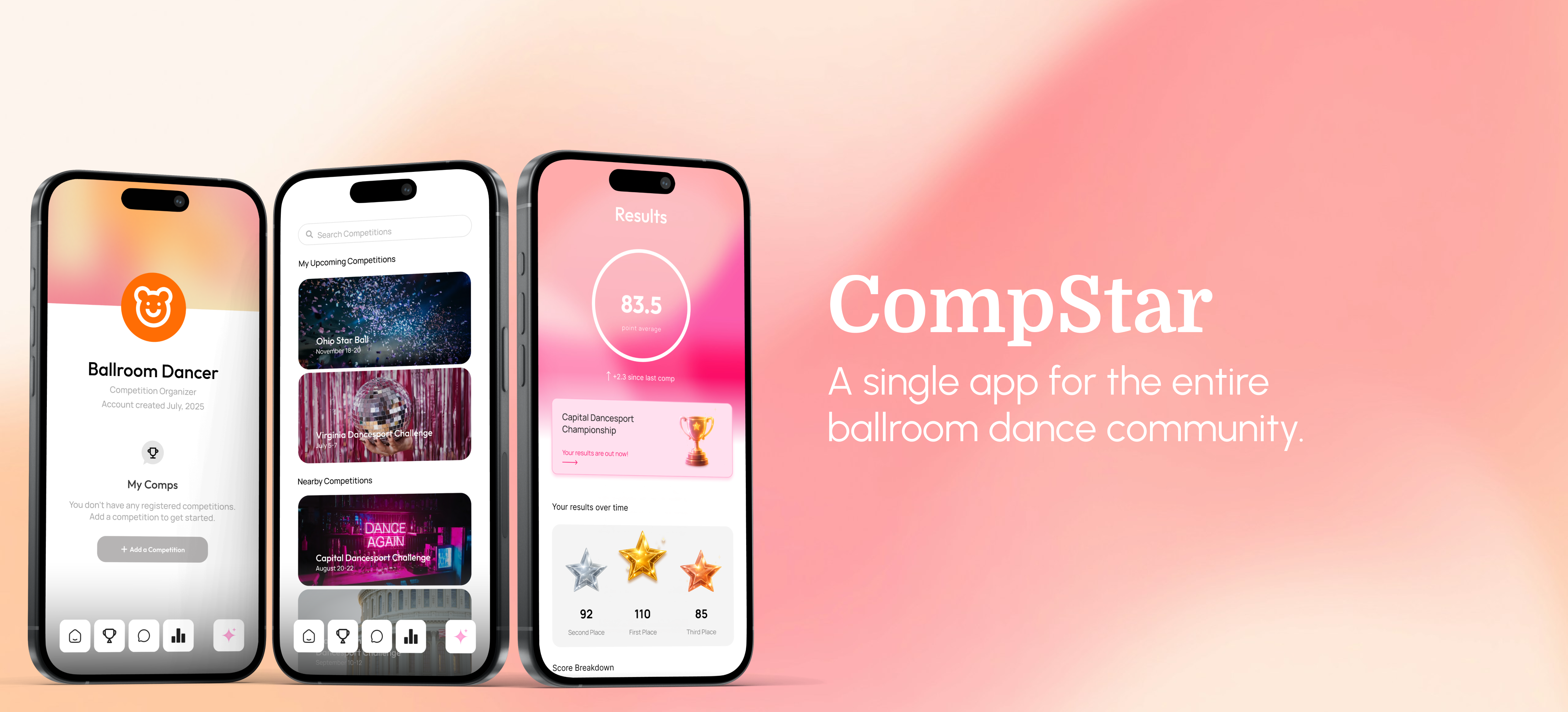
CompStar is a web and mobile application I designed to modernize competition management for the ballroom dance community. After years of participating in ballroom competitions, I noticed how much of the competition experience still relied on outdated, manual processes; from paper heat lists and spreadsheets to fragmented communication between organizers, studios, instructors, judges, and competitors.
I designed CompStar to bring these workflows into a single, intuitive platform, making it easier for organizers to manage competitions while giving competitors and judges a clearer, more seamless experience from registration through the final heat.
The Problem: A Fragmented Experience
Ballroom dancing is a highly collaborative sport, but the technology supporting competitions has struggled to keep up. Many competitions still rely on a patchwork of spreadsheets, paper heat lists, registration forms, and manual communication to coordinate hundreds, or even thousands, of entries.
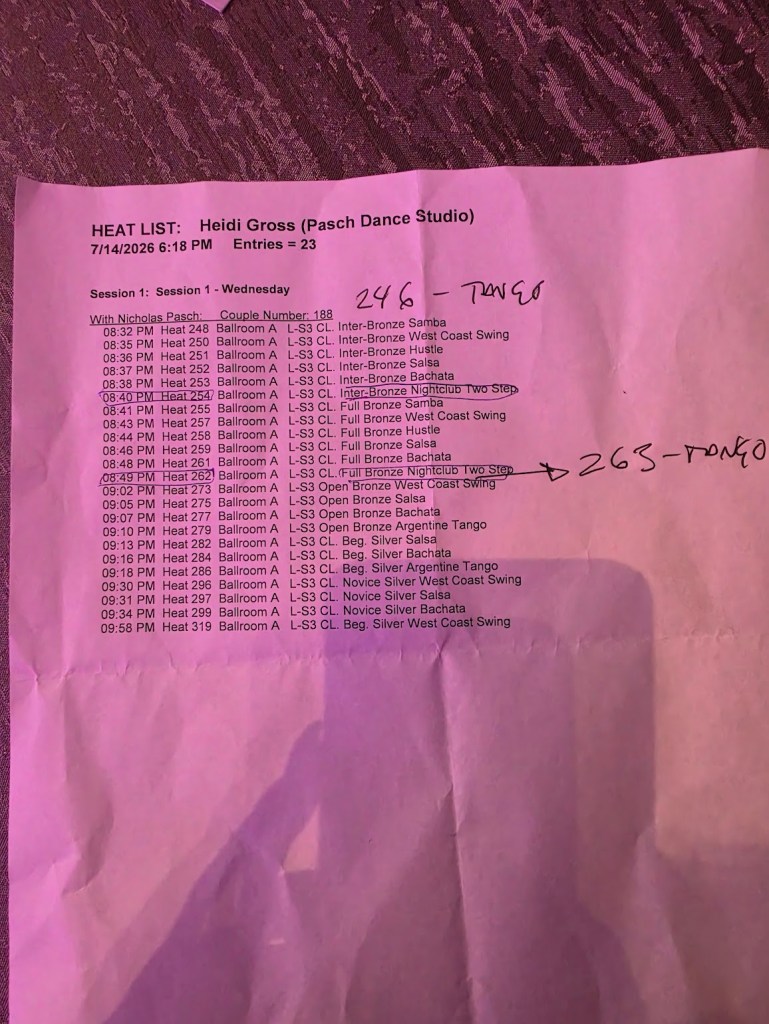
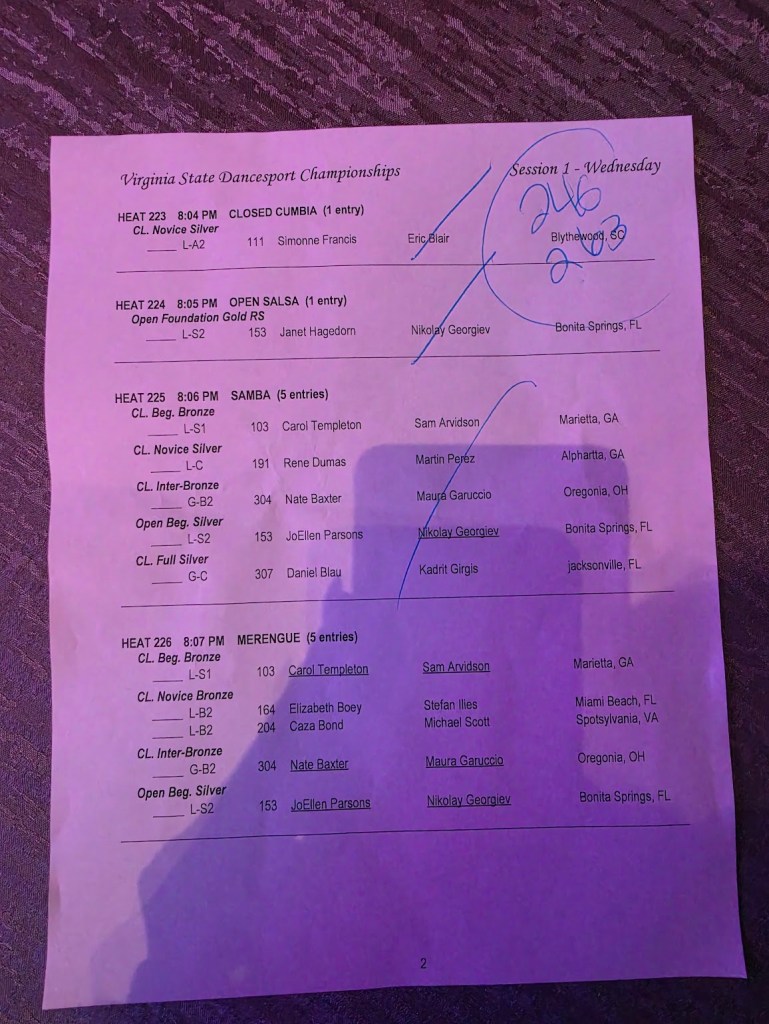
As a competitor, I noticed how much information was scattered across different systems and how difficult it could be to know where to find the information I needed. But the problem extended beyond the competitor experience. Organizers had to manage complex registration and scheduling workflows, instructors needed to coordinate entries for multiple students, and judges needed quick access to constantly changing heat information.
The more I looked at the competition ecosystem, the more I realized that the problem wasn’t simply that the existing tools looked outdated. The entire experience was fragmented. There was an opportunity to create a single platform that could connect the people involved in a competition and make the process easier to manage from registration through the final results.
Creating the Solution
CompStar wasn’t designed in a single sprint. The concept evolved over several months as I became more familiar with the operational challenges of ballroom competitions and experimented with different ways of organizing the experience.
In February 2026, I began meeting with different professional ballroom dancers and instructors in the DC that had years of experience competing with both partners and students. As I spoke with each instructor, I took notes, sketched wireframes, and mapped user journeys.
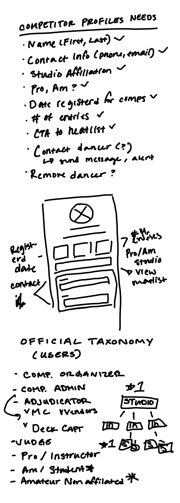
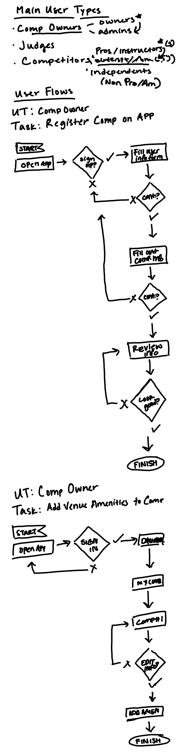
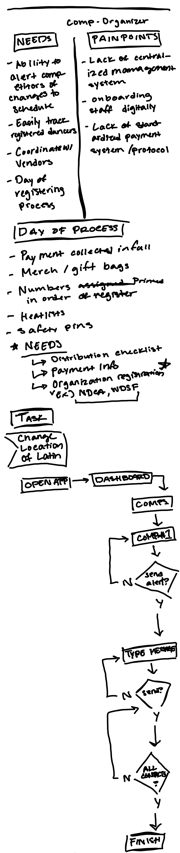
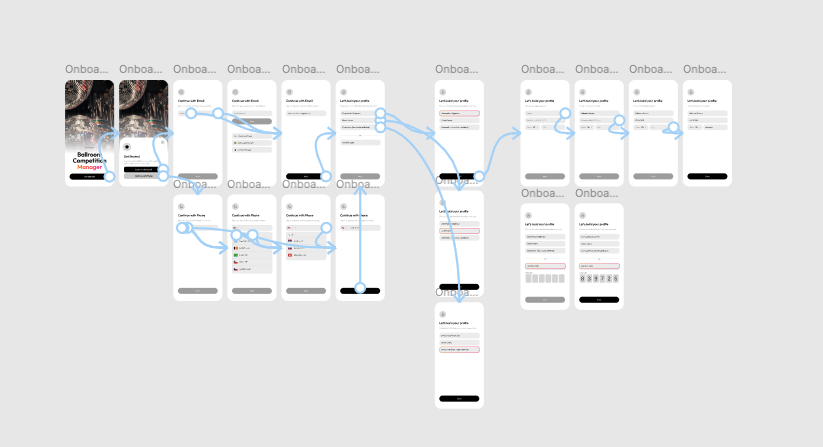
After processing my research, I decided the best solution was a single app which could streamline the entire competition experience, from registration to awards, for all types of participants, including:
- Competition Organizers
- Judges
- Admins/Staff
- Studio Owners
- Professional Instrcutors
- Studio Students
- Independent Competitors
This meant that the app had to accommodate flows such as:
- Onboarding
- Add a Competition (Comp Organizers)
- Register [with payment] for a Competition (Studio Owners, Instructors, Indpendents)
- View/Manage Heatlists (All User Types)
- Judging Portal (Judges)
- Results (Studio Owners, Instructors, Students, Independents)
Designing with Empathy
One thing worth knowing about me is that I was trained as a classical ballet dancer in the Royal Academy of Dance Ballet Conservatory, and now dance at the professional level with a Classical Chinese Dance company (check out my dancing here). Before joining this company, however, I began taking ballroom lessons and competing with my instructor in order to maintain my connection to dance while pursuing a career in the ‘real world’.
During this time, I learned that the most amazing thing about ballroom dance is how incredibly accessible it is. If you go to any ballroom competition in the United States, the vast majority of dancers there are people with little to no formal dance training. It’s an industry that is incredibly welcoming of all ages, backgrounds, and experience levels, and everyone has an opportunity to partake in a genuinely honest competitive process. For many, that competitive aspect makes them feel validated as dancers, and I wanted to acknowledge that and add to that feeling when designing CompStar.
For that reason, I immediately began designing hi-fi mockups in Figma for the student/competitor screens. I knew that I wanted the competitor user experience to…
- Feel visually sleek, legitimate, and professional
- Feature visually stimulating badges informing users of upcoming competitions, newly released results, and judge’s comments
- Highlight improvement between competitions when displaying results
- Allow toggling for push notifications for things like on-deck reminders, heatlist updates, and results
All of these would add to the feeling of the competition experience itself feeling serious, legitimate, and professional.
Heatlists
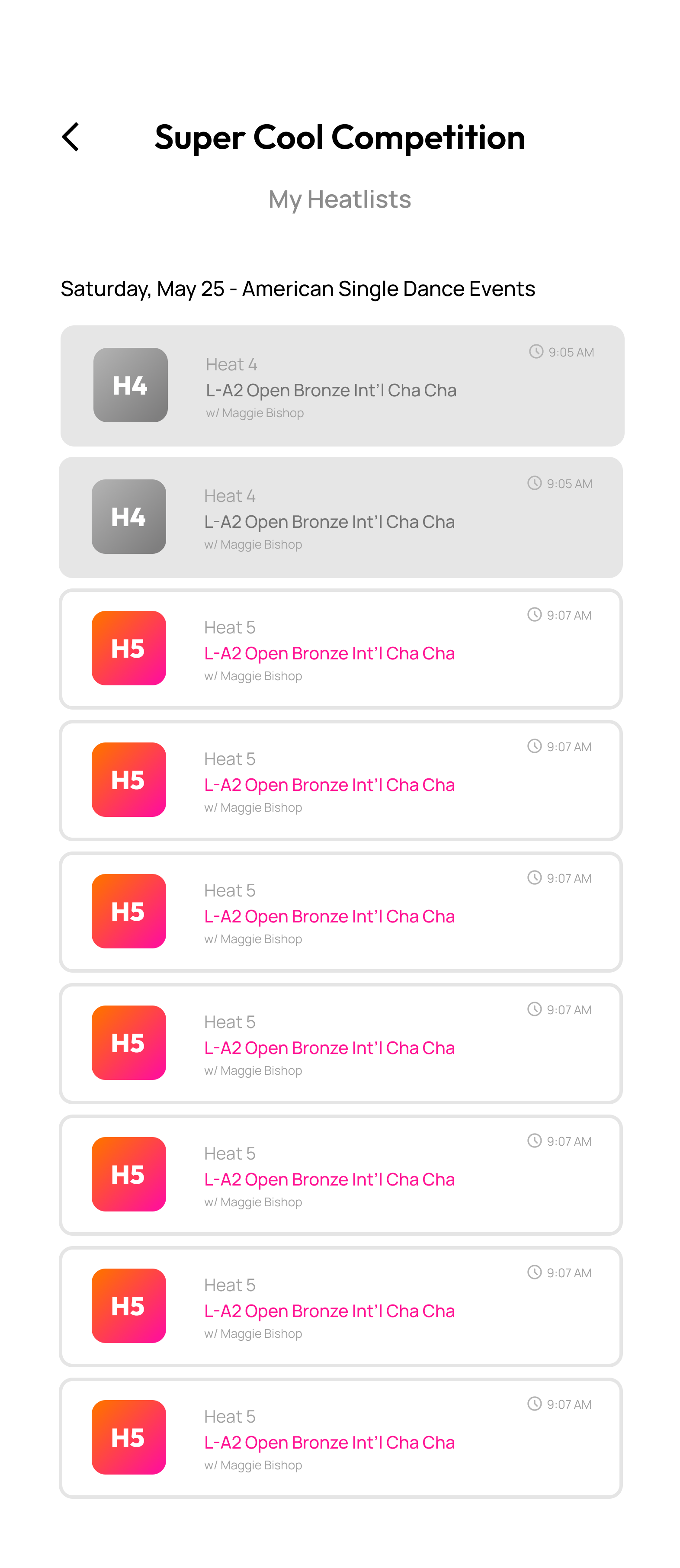
I started with the heatlists, which are effectively the lifeblood of any ballroom competition, and the thing dancers most look forward to receiving in order to mentally prepare for the long competition day.
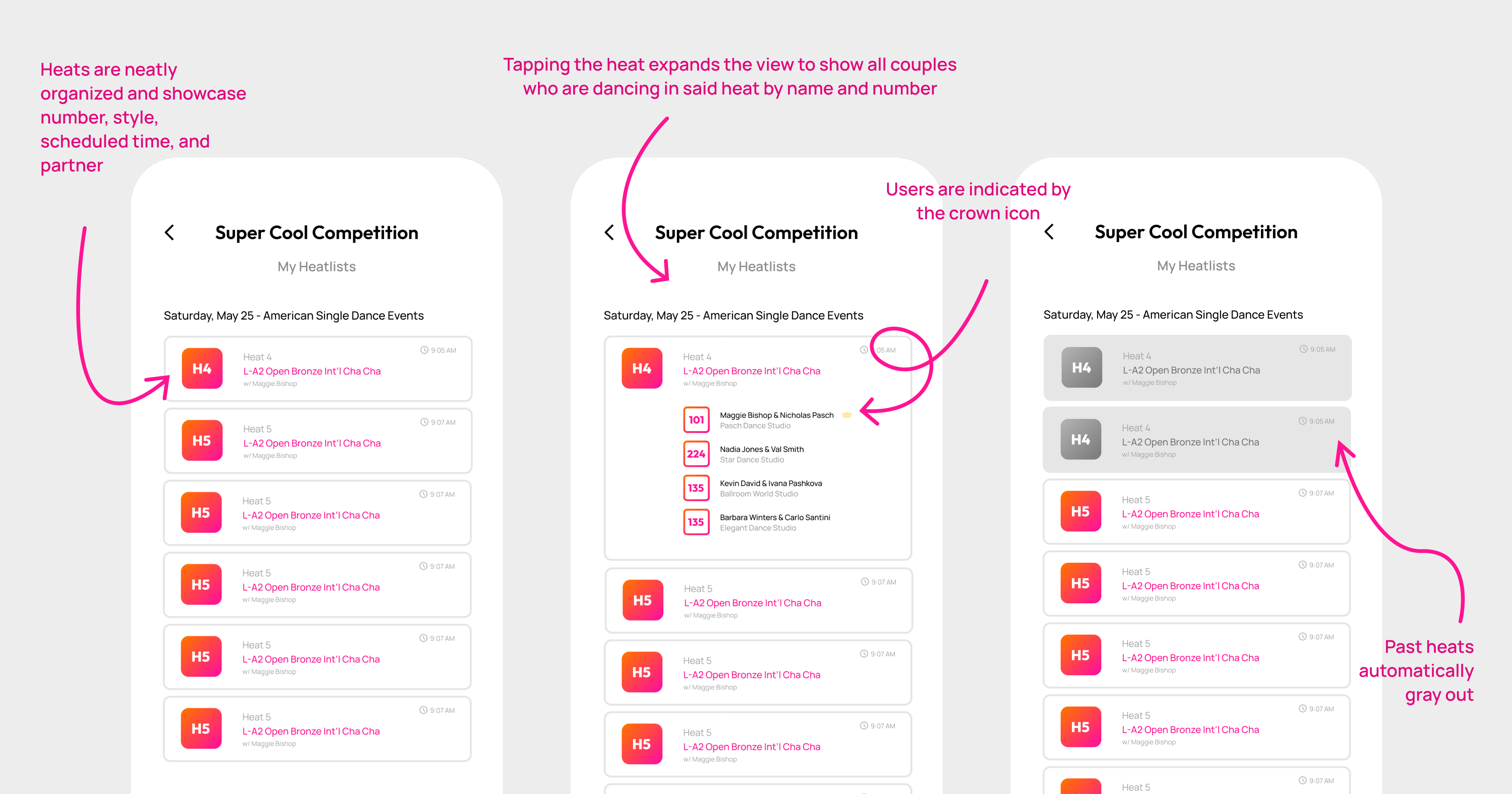
As is showcased above, I optimized the current heatlist system by organizing heats into neatly stacked cards which immediately show users the number, dance style, scheduled time, and assigned partner, but can be expanded to show a list of all couples competing in said heat.
This was a direct response to my firsthand knowledge, validated by my interviews with fellow dancers and instructors, that many people regularly attend competitions for the incredibly social environment they offer, and form networks of friends and acquaintances that they look forward to catching up with at each comp. Adding this feature both satisfies users’ need for logistical awareness of their competition as well as encouraging social exchange.
Registration
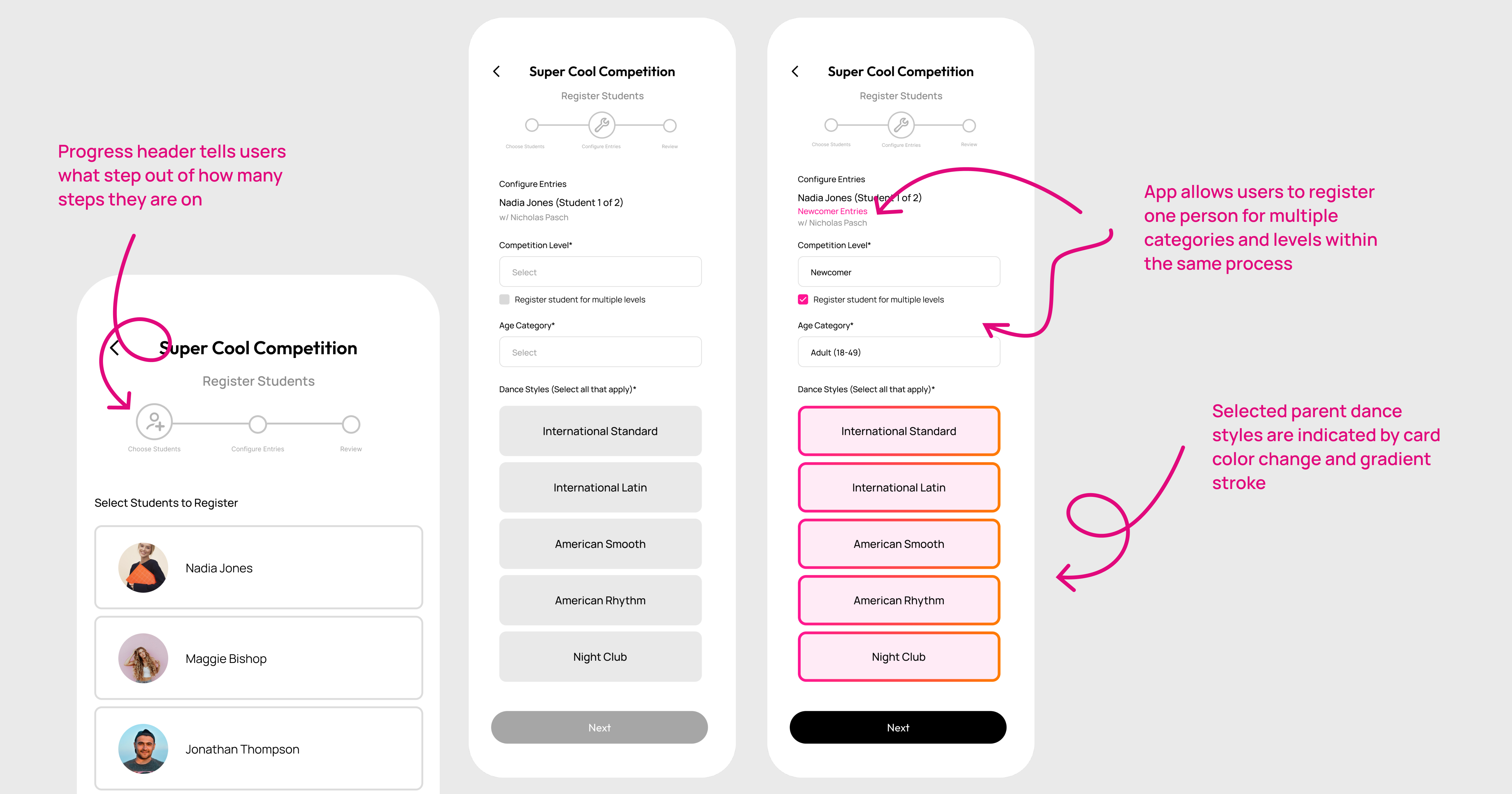
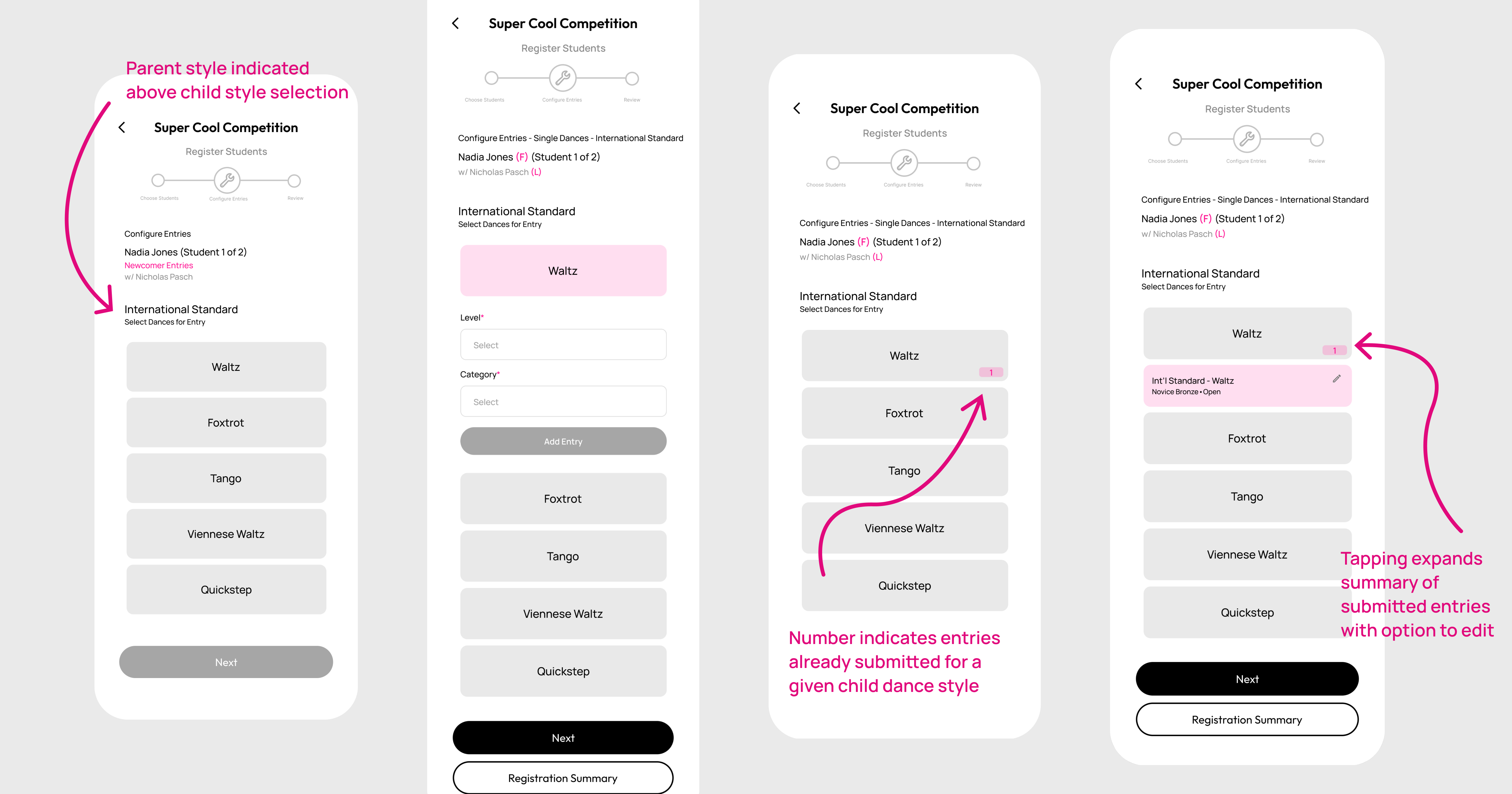
The second flow I was eager to create was the actual registration process. Currently registrations are done entirely on paper. Instructors employed at various studios download PDFs of registration forms, print them, fill them out with pen, and physically mail them to the competition organizers.
I synthesized the information present in these forms into a seamless digital flow with visual cues that would register with students to help them understand the process as their instructors walked them through it.
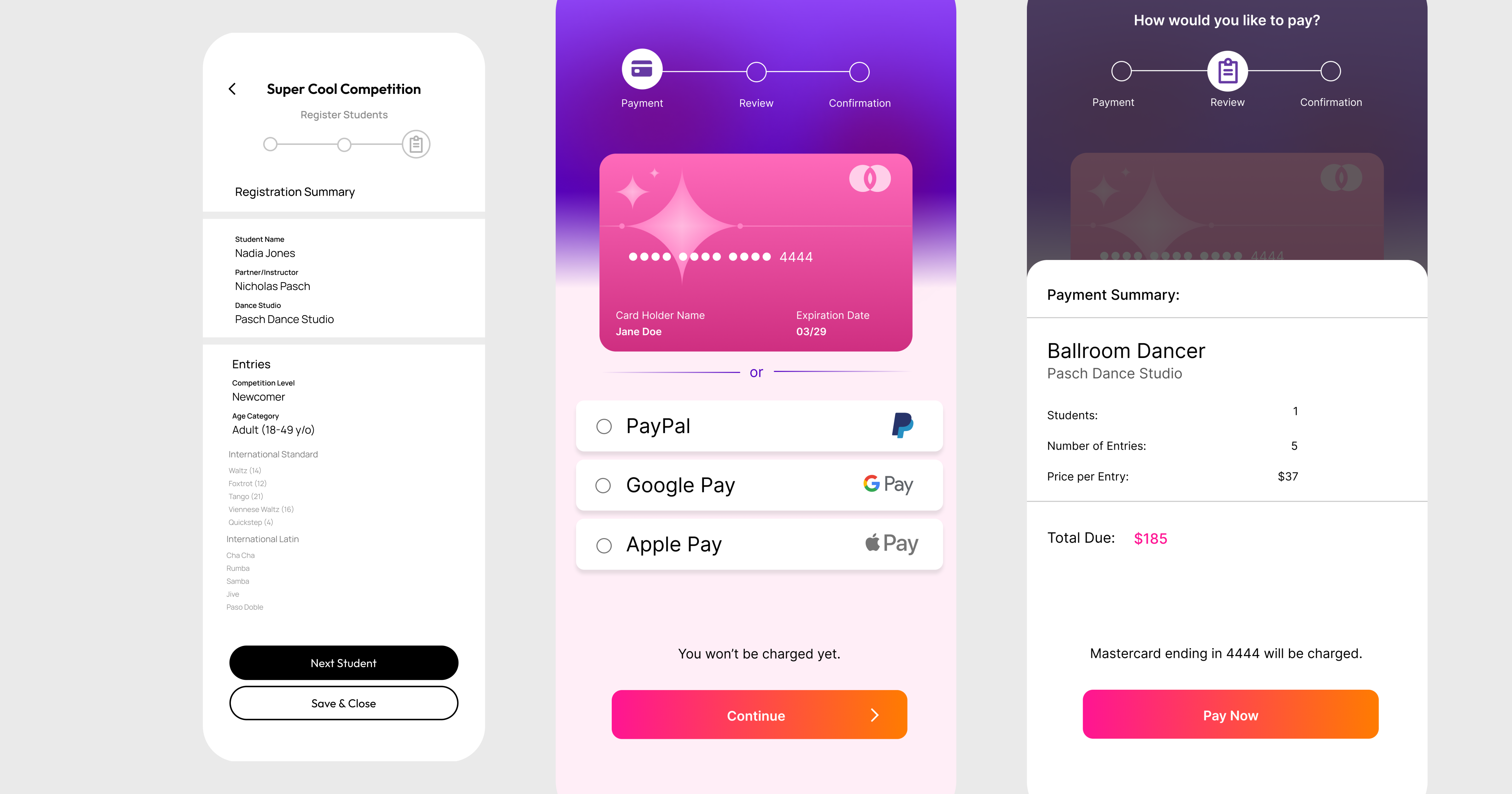
I made sure to include a thorough registration summary that both students and instructors could easily understand. I would also add the ability to share this summary easily via text, email, or other existing communications apps.
Competition Overviews
“Études has saved us thousands of hours of work and has unlocked insights we never thought possible.”
Annie Steiner
CEO, Greenprint
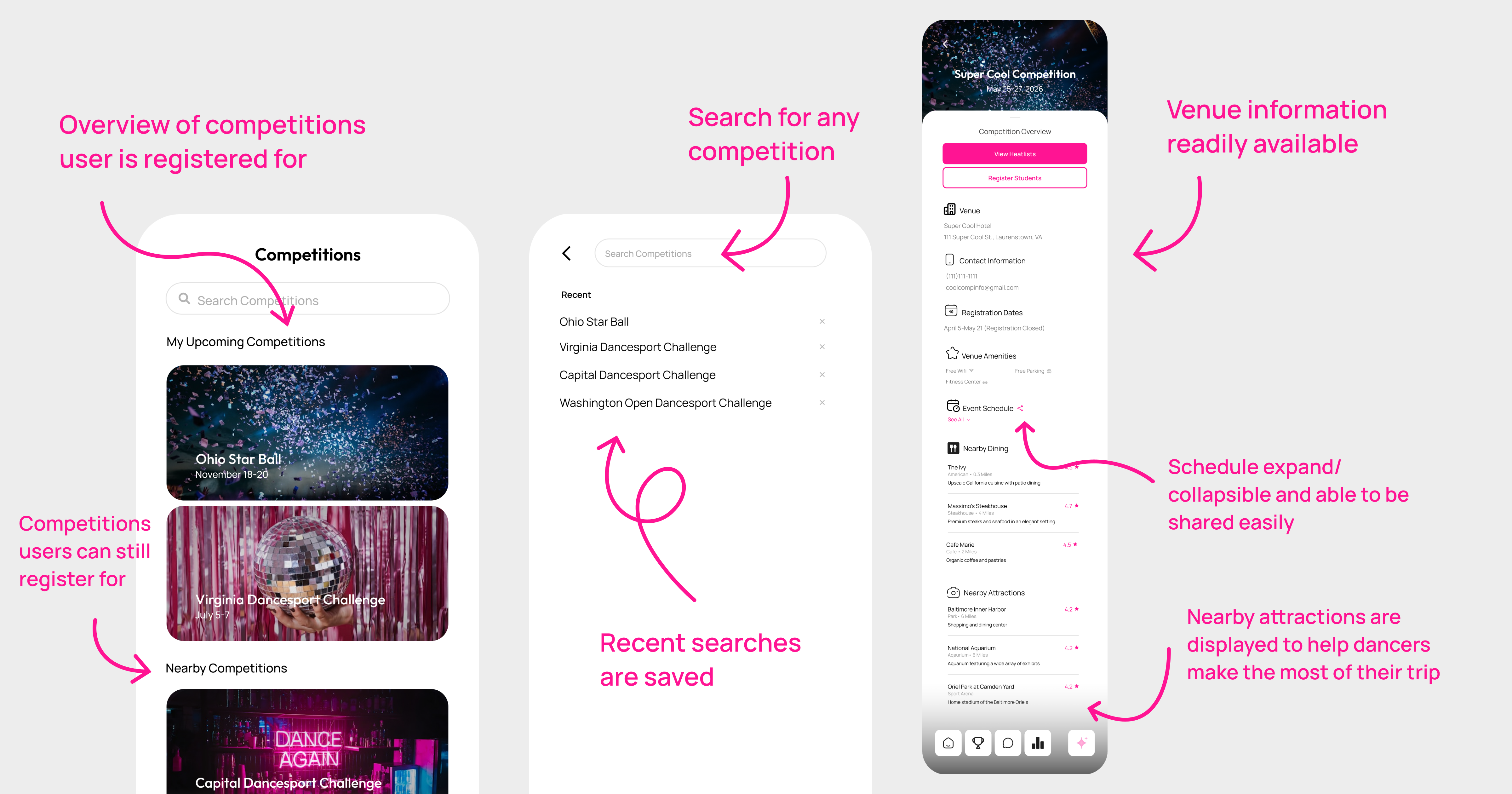
The competition overview screen is the ‘Schedule of Events’ currently offered to competitors on a paper handout, but better. I took the testimonies I received from instructors and students alike regarding competition day exhaustion, anxiety, and material overwhelm, and created an overview screen that serves as an all-in-one stop for all user types seeking comp info.
Implementation
After designing the screens and flows in Figma, I built out a working prototype and started experimenting with bringing the app to life myself using React, Expo Go, and Cursor AI. I was able to get the screens connected and transitions working, but eventually ran into areas that required deeper development knowledge, like user registration, backend functionality, and AI-powered heatlist management. At that point, I decided to bring on a full-stack developer to help turn the prototype into a fully functional app.
Where Are We Now?
CompStar is still in development, but my next step is to get it into the hands of real users. I plan to offer several competitions the chance to host their nightclub events, which are typically much smaller and lower stakes, entirely on CompStar, free of charge, giving organizers, instructors, competitors, judges, and other users a chance to try the product in a real competition environment. Their feedback will help me identify what works, what feels confusing, and what needs to change before the next iteration.
I’m also planning to survey users with different questions depending on their competition role, such as:
Competition Organizers
- Can users set up an event independently and easily without asking for help?
- Is there any point at which users needed to find information quickly during a hectic moment, and were they able to easily find it?
- How much time would users estimate they saved setting up their event compared to their previous system?
Studio Owners/Instructors
- How easily are users able to add/manage students and register them for events?
- How easy is it for users to track their own heatlists and manage student dance times?
- How helpful is the additional information outlined in the competition overview?
Competitors
- How confident are users that the information they’re being shown in the app is accurate?
- What do users most want to see when they open the app?
- How do users feel when they see their results?
Judges
- Do users intuitively understand what to do without being instructed?
- Is the judging interface fast enough to move in real-time with the competition?
- Is there anything distracting users or slowing them down?
Takeaways
CompStar still has plenty of testing and iteration ahead, but I’m proud of how far it has come. I identified a problem I experienced firsthand in the ballroom world and took the initiative to design and develop a solution. While I designed CompStar independently, the product was shaped by conversations, feedback, and ideas from ballroom dancers, teachers, and studio owners throughout the DC area. Their experiences helped me understand the problem from different perspectives and build something that I hope can make competition day a little easier for everyone involved.
Most importantly, this project showed me that I don’t have to wait for someone else to solve a problem. I can notice something that isn’t working, ask questions, bring people into the process, and start building a better solution.
More Projects
 Lauren Dravis — Product Designer